You can create an llms.txt file in four steps:
1. Create a configuration
In the OpenCms Explorer, open the root directory of your website (/). In the Magic Wand menu, under Configurations, select the content type “llms.txt configuration.”
In the creation dialog, enter llms.txt as the file name and click OK. Make sure the file is located directly in the root directory of your website.
2. Define titles and sections
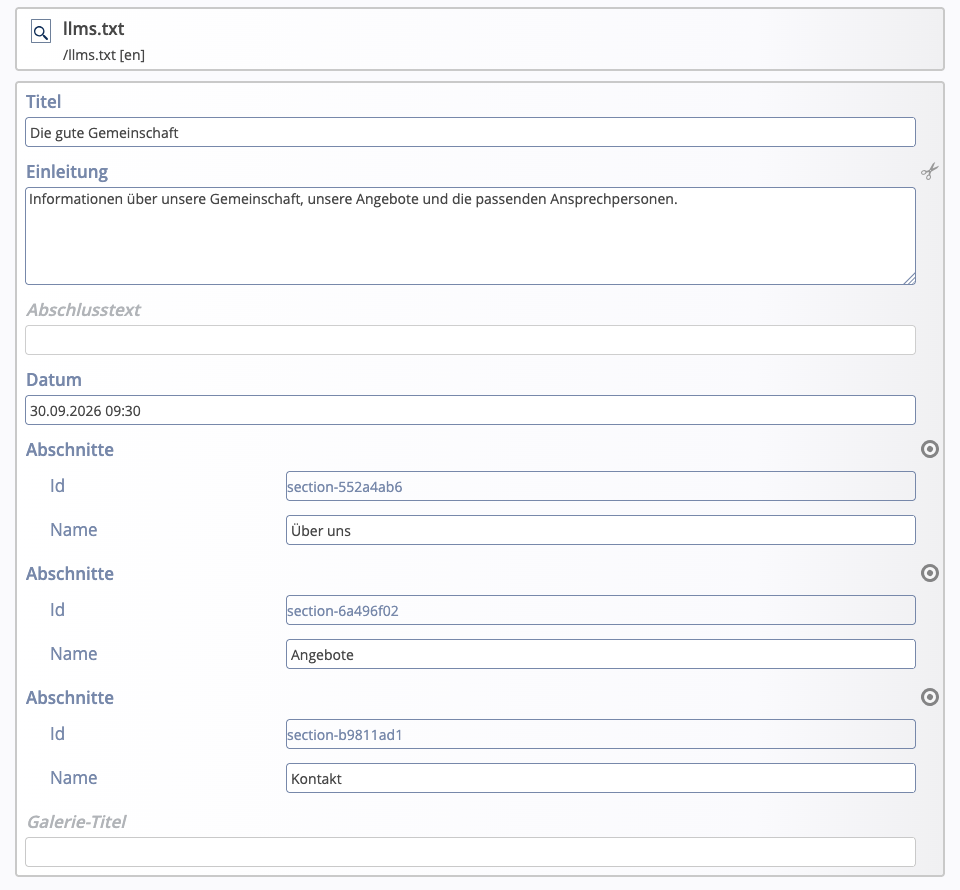
Open the created file via “Edit” in the form editor and fill out the configuration:
- Title: Name of your website or organization. This appears at the beginning of the output.
- Introduction: Optional: a brief explanation of what information your website provides and who it is intended for.
- Sections: Thematic groups for the selected pages, such as “About Us,” “Services,” and “Contact.”
- Closing text: Optional: an additional note at the end of the output.
Use the plus icon [+] under “Sections” to create the desired groups and enter a name for each one. The ID is assigned automatically. You do not need to change the “Date” field for manual maintenance. Save the configuration before assigning the pages.